
If you are experiencing any IT or software related difficulties within your company, please follow the procedures below to open support requests with Blackline IT. Our dedicated support team will assist you within our SLA. Please be sure to include all details within your request to help us better serve you.
Normal Business Hours (8:00 AM – 5:00 PM CST)
After-Hours Emergency (Outside 8:00 AM – 5:00 PM CST)
- Describe the emergency and its impact on business operations
- Provide the best method for contacting you to resolve the issue or provide status
- The “On-Call Engineer” will be notified and will contact you as soon as possible
- The “Account Manager” will also be contacted and will assist as needed
- After-hours additional rates will apply to all requests outside of normal business hours
After-Hours Non-Emergency (Outside 8:00 AM – 5:00 PM CST)
- Tickets submitted to these channels during this time will have after-hours information within the email notification. This is a useful reminder if you need emergency help, to call into our office.
- Non-emergencies are treated as business hours requests and will be addressed the next business day or when our offices open.
Helpdesk Ticket Notifications
- Once a request has been submitted to our support channels, you will receive an automated email notification regarding your submission (see below). If you need to add any details, simply reply to this thread—your response will update the ticket.
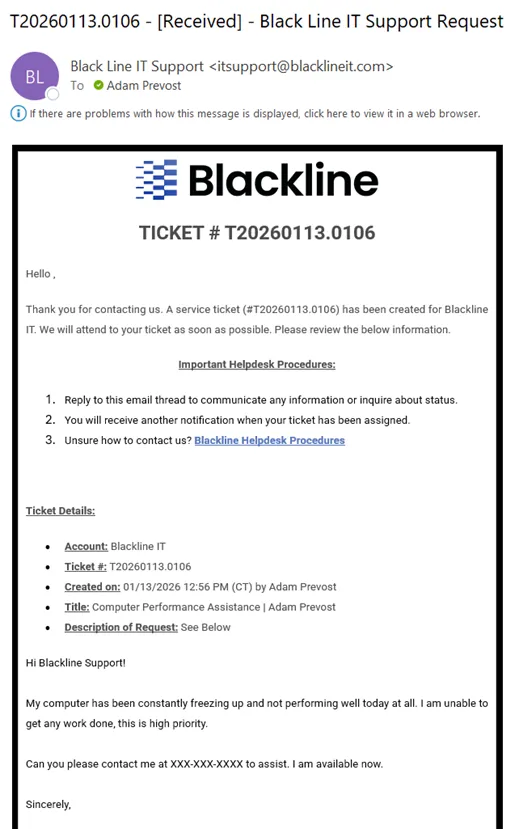
- Blackline IT Helpdesk will then assign the ticket to an engineer, and you will receive a second email notification informing you that it has been assigned. The assigned engineer will contact you within SLA based on the request priority.
Helpdesk – Client Ticket Communication
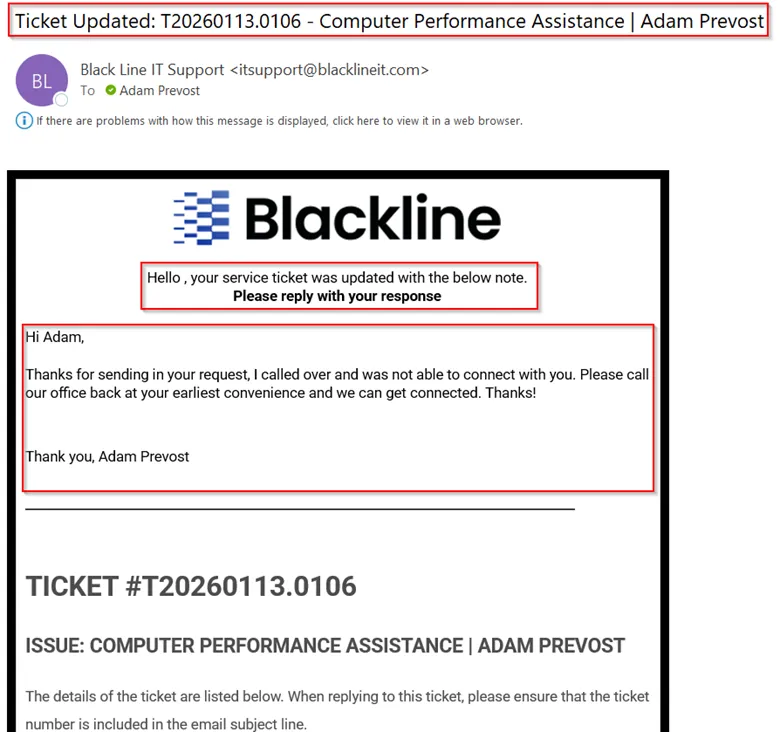
Blackline IT engineers will communicate via email through our ticketing system. The email notification below is crucial to pay attention to, as it contains our response to you as the ticket contact(s).
If you need to communicate anything regarding the ticket generated for you (including status updates), simply reply to the ticket notification email thread. This will notify the assigned engineer and we will communicate back as needed.
Important Reminders When Opening Support Tickets
Please ensure the following when submitting requests—whether via email, portal, or phone call. This will help us support you at the highest level and provide the quickest turnaround time.
- Include reference to the Technology, System or Entity effected
- Provide description of the issue at hand
- Provide screenshots or other data to help us troubleshoot as needed
- Provide your name and most-relevant contact method for you
- Provide priority of your request (Low, Medium, High, Critical)
- Do not copy other automated systems if submitted via email
- Have updated information or questions after your ticket is created? Simply email back through the ticket assigned thread from Blackline IT Support.
Any questions or clarity on the above can be directed to success@blacklineit.com
Agent Browser Walkthrough for Ticket Submission
You can submit tickets to Blackline IT and view your computer information from the Agent Browser located on your computer. (Windows Devices Only)
- Double-click the Agent Browser icon located on your desktop or taskbar
- Your first view will default to the Summary tab, which shows your computer information (name, IP address, model, operating system, and other specs)
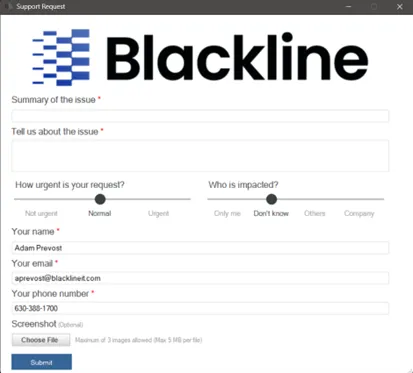
- To open a ticket, navigate to the Tickets tab and select New Ticket. You can also review any open ticket status from this tab
- Fill in the ticket details, upload any screenshots, and click Submit. You will receive confirmation of the ticket submission along with an email notification. Your request will go to our ticketing system, and an appropriate engineer will be assigned and contact you within the service level
Network SLA Priority Matrix
| Priority | Possible Issue | Response Time | Resolution Time |
|---|---|---|---|
| Critical | Critical systems with a direct impact on production are down. No workarounds are immediately available. Examples: Server down, widespread network outages affecting multiple machines, major software systems down, other server-based system failures. | Within 30 minutes | ASAP, or within 8 hours |
| High | Single- or group-user outage or service interruptions. The impact hinders normal production. No or limited workarounds are available. Examples: Failed computer, bad switch, broken monitor, multi-user software failures, main production printers down. | Within 2 hours | Within 1 business day |
| Medium | Single- or group-user interruptions in normal business activities. Issues impact productivity, but a viable workaround is available. Examples: Workstation is down but another is available, error messages, primary printer not available, system slow but functioning. | Within 4 hours | Within 2 business days |
| Low | Single-user issue does not hinder production or general operation. Examples: Occasional error messages, end-user training issues, regular local updates, printer installations, local printer down, local hardware slowness. | Within 8 hours (1 business day) | Within 3 business days |
Software SLA Priority Matrix
| Priority | Possible Issue | Response Time | Resolution Time |
|---|---|---|---|
| Critical | Critical systems with a direct impact on production are down. No workarounds are immediately available. Examples: Website/system down, hard error in critical business process, corrupted data preventing operations, major software systems down. | Within 2 hours | ASAP, or within 8 hours |
| High | Single- or group-user system interruption. The impact hinders normal production. No or limited workarounds are available. Examples: User/group specific software failure or hard error, limited or difficult workaround available, continued interruption will escalate to critical. | Within 4 hours | Within 3 business days |
| Medium | Single- or group-user interruptions in normal business activities. Issues impact productivity, but a viable workaround is available. Examples: System slow but functioning, very specific error difficult to repeat, inaccurate reporting data, issue limits one or very small user group. | Within 8 hours (1 business day) | Within 4 business days |
| Low | Single-user issue does not hinder production or general operation. Examples: Annoying error messages, false positives, user training issues, occasional error messages, local hardware slowness, enhancement requests. | Within 16 hours (2 business days) | Within 5 business days |